
#Engaging
Engaging is the act of putting live AWS credentials on your machine. Everything else in Sleipnir exists to make this one action safe and fast.
#What happens when you press ENGAGE
- For each target service, Sleipnir resolves the account and role for the requested environment and mode.
- It calls
GetRoleCredentialsagainst AWS SSO for each one, in parallel. - It writes a
[profile <alias>]stanza to~/.aws/configcarrying the region. - It writes the credentials to
~/.aws/credentialsunder[<alias>]. - It records the engagement in
~/.sleipnir/state.json.
If the org's SSO session has expired, the login runs first and the engage continues automatically afterwards — the click survives the detour.
#Why static keys
Sleipnir delivers real static keys — aws_access_key_id,
aws_secret_access_key, aws_session_token — rather than wiring a
credential_process helper.
The reason is coverage. A credential helper requires the consumer to
execute a subprocess, and sandboxed applications cannot. Static keys in
~/.aws/credentials are the one delivery mechanism that every consumer
understands:
aws sts get-caller-identity --profile core-services
import boto3
boto3.Session(profile_name="core-services").client("s3").list_buckets()
Terminals, SDKs in every language, IDE plugins, Docker builds that mount
~/.aws, and sandboxed GUI apps all work with no extra configuration.
Sleipnir still ships a sleipnir creds --profile <name> resolver that
implements the credential_process contract, kept for anyone who wires
it up by hand. It is no longer written into your config automatically.
#Keeping credentials fresh
Role credentials from AWS SSO are short-lived — typically an hour. Sleipnir refreshes engaged profiles in the background before they expire, writing fresh keys into the same profile.
The practical effect: a terminal you left open yesterday still works this morning, without you touching the app, right up until your organization's real SSO session boundary.
The ⚡ connection test also self-heals before probing. If a profile's keys are stale, they are rotated first, so the test reports the health of the live path rather than yesterday's leftovers.
#Checking a profile
Click an engaged profile in the rail to reveal its details — profile name, account ID, region, role — each click-to-copy.
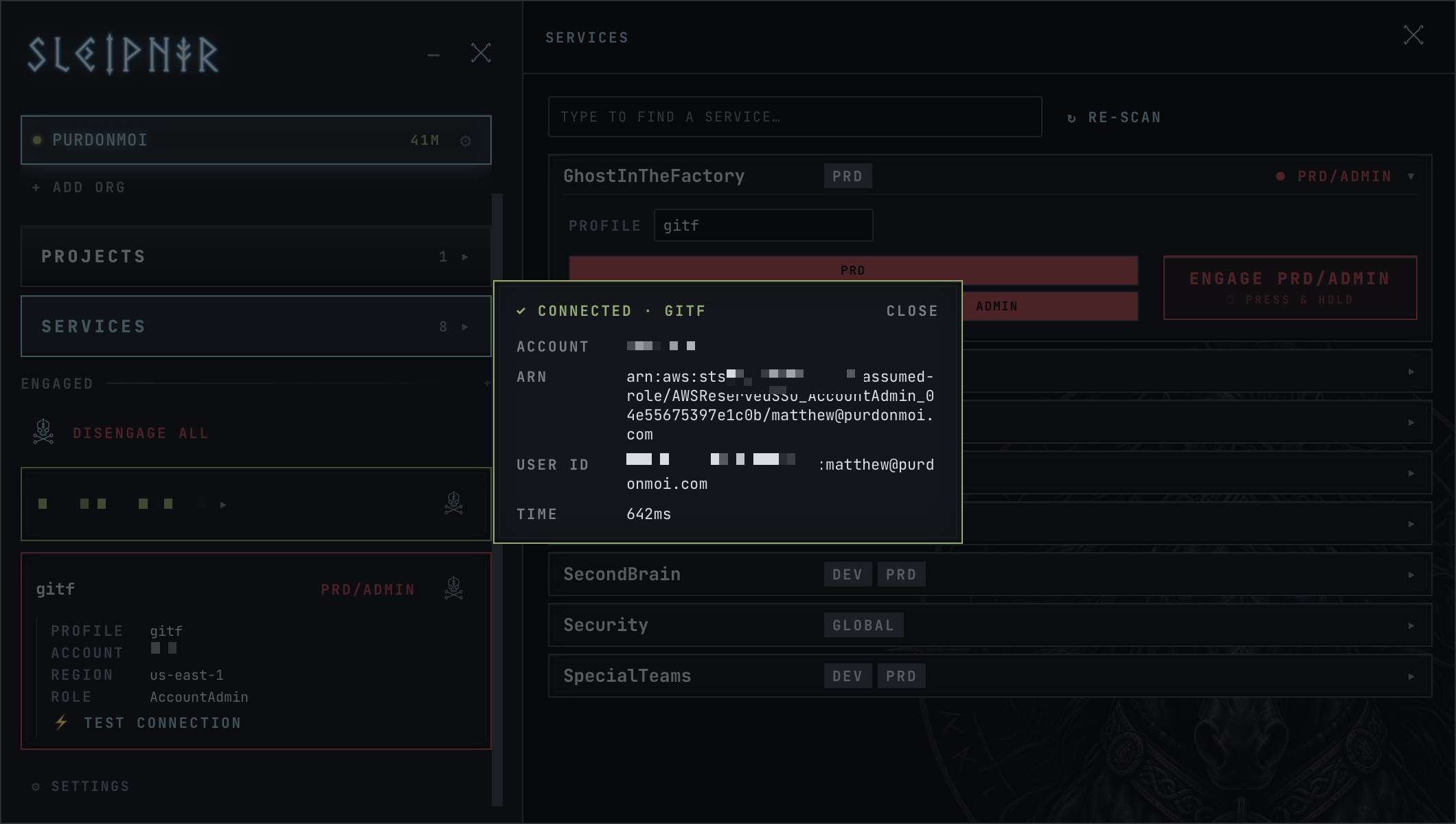
⚡ TEST CONNECTION shells out to the real AWS CLI:
aws sts get-caller-identity --profile <alias>
Nothing about it is simulated. It reads your actual ~/.aws/config, uses
the credentials actually on disk, and hits STS over the network — the exact
path your terminal takes. You get back the account, the ARN, the user ID
and how long it took.
If the test fails, the failure is real too, and the message is the one AWS returned. That makes it a genuine diagnostic rather than a green light the app grants itself.
The test needs the AWS CLI on your PATH. If it is not installed,
brew install awscli — everything else in Sleipnir works without it.
#Disengaging
Press the disconnect icon beside a profile, a project group, or DISENGAGE ALL.
Disengaging releases your hold on the profile. When that was the last hold, it also:
- removes the profile from the engaged map in
state.json - deletes its cached role credentials
- strips the three static keys out of
~/.aws/credentials
That last one is the point. With static-key delivery, disengage means the secrets are gone from disk, not merely refused by a helper. A script that runs after you disengage finds no credentials, because there are none.
If something else still holds the profile — another project, or a direct engage — the keys stay and Sleipnir tells you so rather than pulling them out from under work you did not mention. See Shared services below.
The ~/.aws/config stanza stays, carrying only the region. It holds no
secret, and keeping it means your profile names remain stable across
engage cycles.
#Shared services
One AWS profile holds one set of keys, so two projects that both include a service — readonly on a shared event bus, say — share a single engagement rather than getting one each.
Sleipnir tracks who is relying on it. A profile held by more than one thing shows a ×N badge whose tooltip names them, and disengaging one holder does not strip the keys while another still needs them. You get a note saying what was kept and who is still using it. The credentials are removed only when the last holder lets go.
That covers services wanted at the same environment and mode, which is the common case. Two projects wanting the same service at different environments is a genuine conflict — there is one profile, and it can point at one account at a time. See below.
#Repointing
Engaging a service at a different environment or mode than it currently holds repoints it: the same profile, different account.
Because that has side effects on work you may have in flight, Sleipnir warns first, naming what the profile is currently set to and which project put it there. Re-engaging a service from its own row skips the warning — the only thing it can collide with is itself.
#Partial failure
Engage never fails as a unit. Each service reports its own status — assuming, done, or failed — and one failure does not roll back the successes. A six-service project where one account is missing a role engages the other five and tells you which one did not make it.